PILOTLOG PLATFORM
Mobile maintenance app for pilots redesign
Redesign the maintenance report user experience application for pilots to improve usability and reduce paperwork usage.
"How I turned complexity, constraints, and code challenges into a streamlined, resilient experience for pilots"
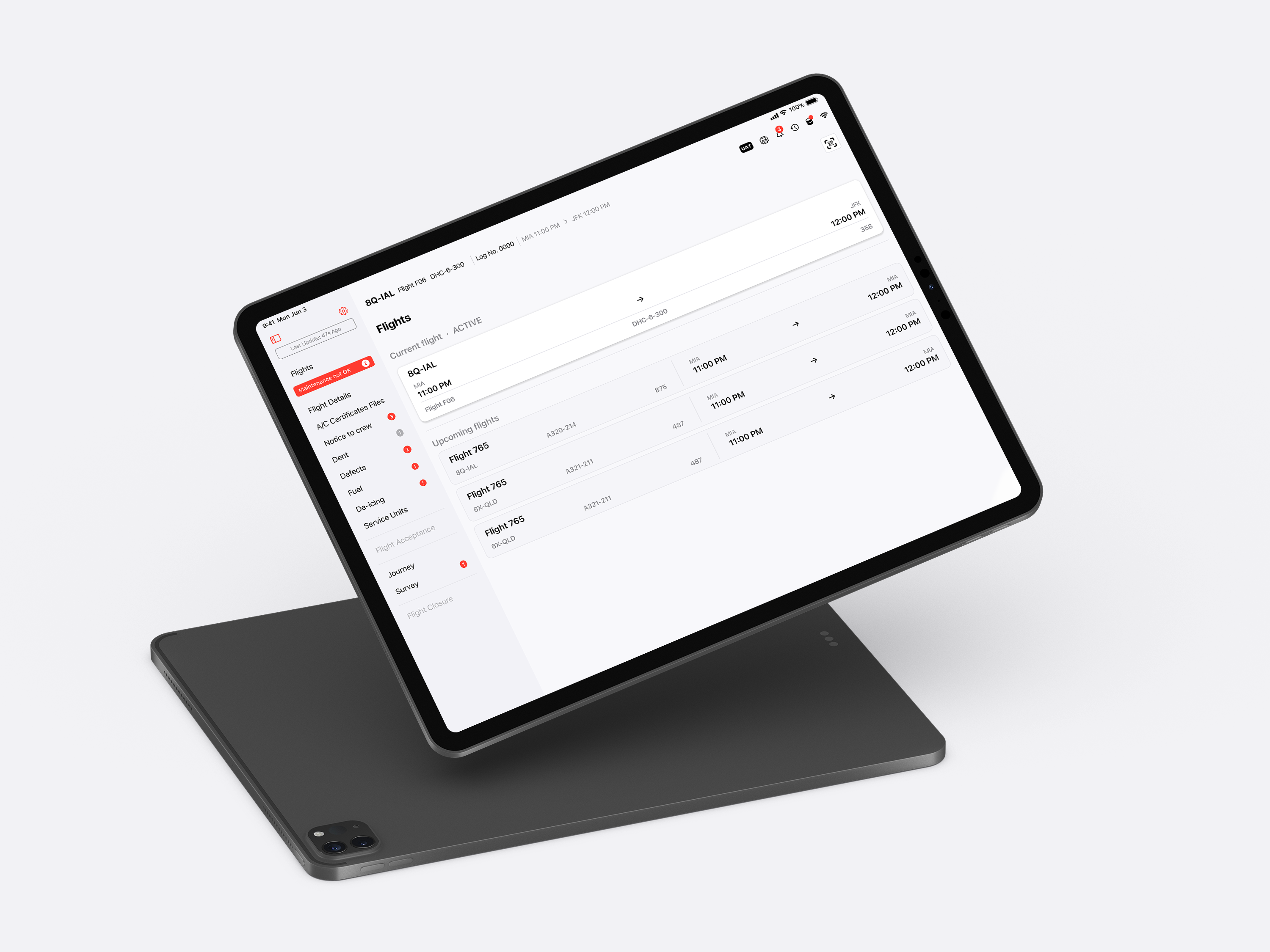
PilotLog is a native iOS app designed for aircraft pilots to manage maintenance reports before, during, and after flights. The goal was to revamp the dashboard to mimic traditional paper maintenance reports while enhancing navigation for quick and easy access.
The Dashboard Looked Like a Puzzle
Navigation Issues
During a product audit of PilotLog, I noticed something that didn’t sit right. The layout was cluttered, and the color contrast was inconsistent. Key tasks required multiple taps through mismatched screens. The error message lacked guidance, and navigating felt unfamiliar.
User Interface (UI) Consistency
A stakeholder told me:
User Feedback and Guidance
“There are too many clicks… we need to bring things into one place.”
Problem
Navigation Issues
The app was critical for pilots and mechanics tracking aircraft maintenance—but the interface made it harder, not easier.
User Interface (UI) Consistency
- Poor information hierarchy and vague color contrast
- Each screen used different UI logic and layout
- Too many screens to complete simple tasks
- Developers struggled with the inconsistent structure
- Little to no explanation of the error message and guidance
User Feedback and Guidance
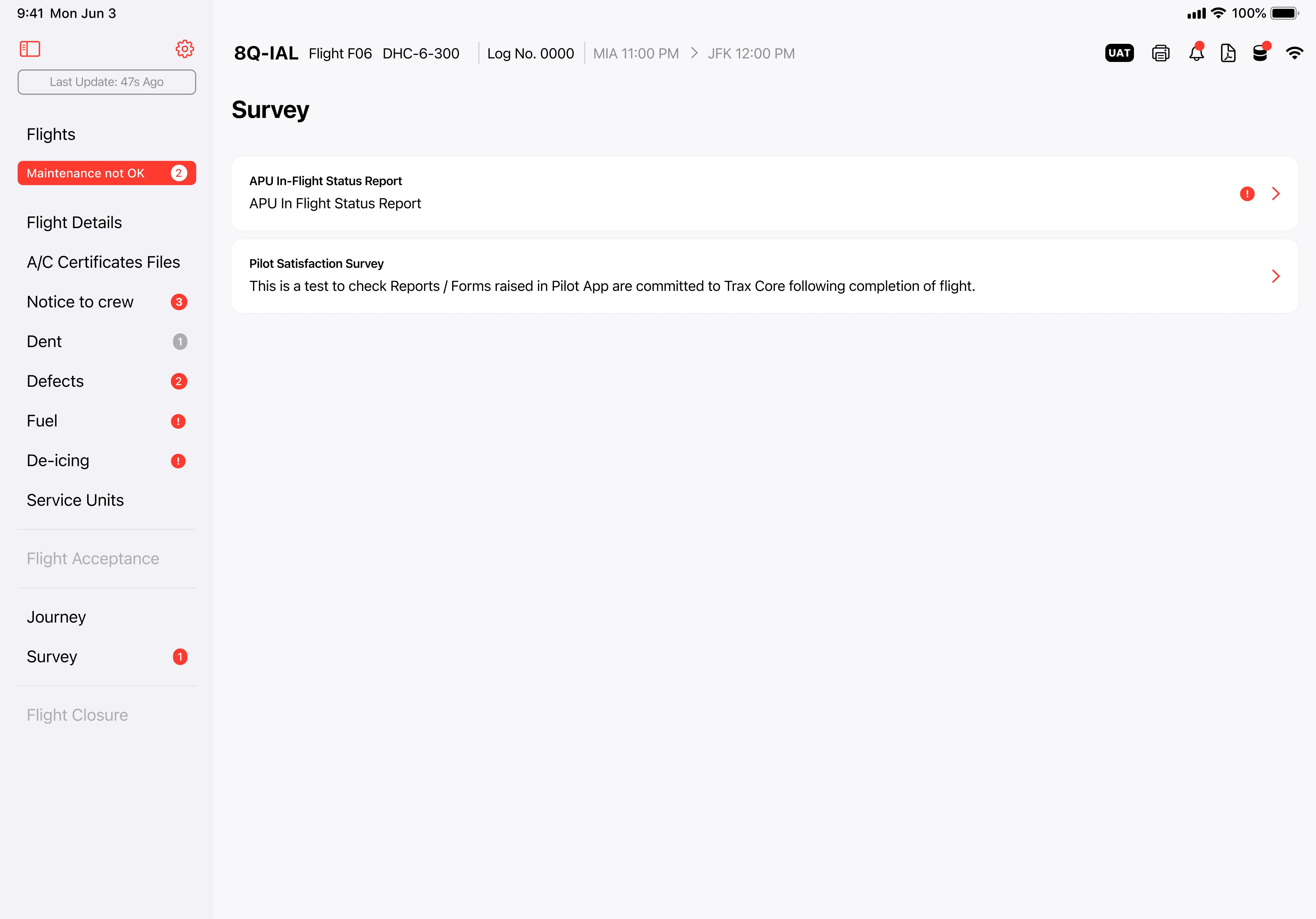
My Proposal: Create a simplified, native iOS dashboard using a split-view layout that streamlines task flow and respects platform conventions.
How Might We…
1.
…make the dashboard intuitive enough for a pilot to scan in under 7 seconds?
2.
…reduce taps and screen-switching while keeping everything essential in one view?
3.
…design a scalable system for future reports?
Solutions
Improve Accessibility
Design a sidebar dashboard to enhance navigation, allowing users to quickly access key areas of the app and improve task completion rates.
Enhance UI Consistency
Create a dashboard with a familiar layout and features similar to other applications to reduce cognitive load and the learning curve for users.
Refine Error Messages
Revise error messages to make them clearer and more actionable by specifying what went wrong and providing concrete steps to resolve the issue.
Research & Industry Inspiration
I didn't just look at EHRs or UI kits—I analyzed real-world airline and competitor applications.
I audited:
- Task flows: How many screens to complete a task?
- Hierarchy: How easy was it to scan?
- Completion logic: What made the flow feel “finished”?
This helped me break down how mechanics and pilots naturally expect to interact with digital tools—and where ours fell short.
Interviews
Conducted 5 one-on-one interviews to assess the app's interface, focusing on understanding user needs and behaviors. Participants completed tasks related to navigation, adding defects, and creating final reports to identify usability challenges.
Heuristic Evaluation
Inconsistent Visual Design
We conducted a heuristic evaluation using Jakob Nielsen’s 10 usability principles, focusing on the app's navigation and content presentation. This evaluation revealed significant usability issues.
A primary concern was the lack of consistency, which increased cognitive load and required users to spend extra time learning new elements. Furthermore, poor alignment between the system and real-world expectations led to confusion over vague notifications and popup messages, causing uncertainty about task progress and next steps.
Other issues included poorly structured context, which confused users about message purposes and hindered task completion.
Overall, this evaluation highlighted key problems early on, guiding the redesign towards a more intuitive and user-friendly mobile application.
Persona
Based on the app's purpose, our primary users are experienced commercial pilots who will use the app regularly. One of our main business goals is to establish strong relationships with larger airlines.
This user persona allows us to identify and gain a deeper understanding of our target audience. It guides us in designing less complex tasks, informs our ideation process, and helps us achieve our goal of improving user experience and visual design.
Alex Walker
Age: 40
Job Title: Commercial Airline
Pilot Experience: 12 years of flying experience, including 5 years as a captain
Location: Atlanta, Georgia
Background
- Captain Alex works for a mid-sized commercial airline and flies domestic and international routes.
- He is responsible for ensuring flight safety, including promptly reporting maintenance issues after every flight.
- Familiar with aviation software but prefers intuitive and straightforward tools due to limited time between flights.
Goals
- Efficient Reporting: Submit maintenance reports quickly and accurately to minimize delays.
- Clear Communication: Ensure mechanics fully understand reported issues to facilitate smooth and timely resolutions.
- Compliance: Stay compliant with aviation regulations by providing detailed and accurate documentation.
- Time Management: Avoid spending excessive time on administrative tasks so he can focus on pre-flight and post-flight responsibilities.
Behavioral Traits
Comfortable with aviation technology, values simplicity, reliability, and tools that streamline workflows. Prioritize accuracy in reports to ensure safety and rely on clear communication with ground crews and mechanics.
Software Needs
Clean, minimalistic design with clear navigation and labels. Automatically populate basic flight details (e.g., flight number, tail number) to save time. Ability to save reports offline and sync later in case of connectivity issues. Responsive design for tablets and small screens.
Quote
"Every minute counts during a turnaround. I need software that lets me report issues without getting bogged down in unnecessary steps."
Ideation
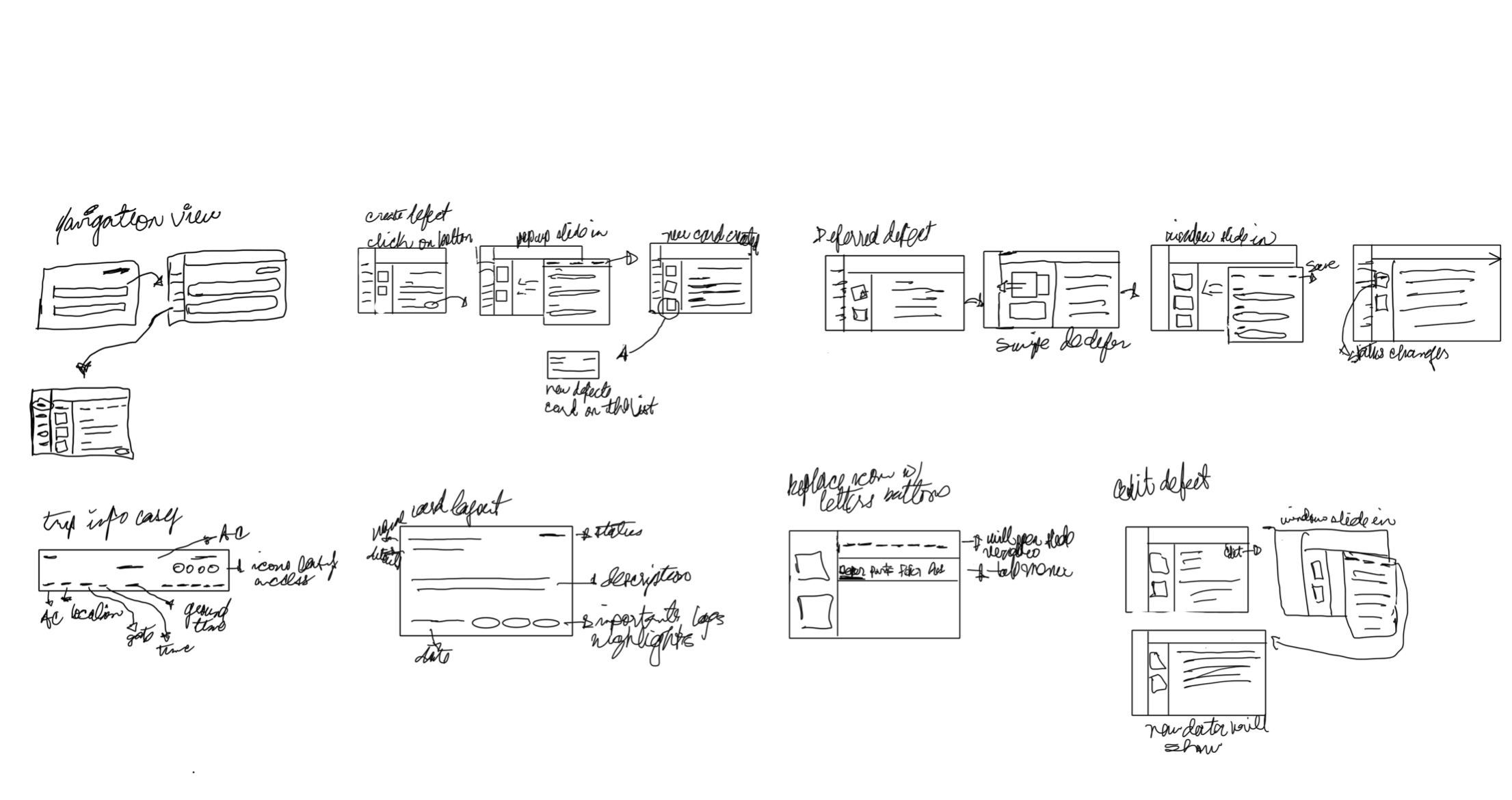
I use rough sketches to fine-tune concepts and brainstorm potential solutions. This approach helps me quickly visualize functionality and pinpoint essential features.
Failed Concept: Card-Based Dashboard
I didn't just look at EHRs or UI kits—I analyzed real-world airline and competitor applications.
My first idea was a modular card layout with dynamic sizes. It looked modern and stakeholders initially liked the concept.
But then…
- SwiftUI couldn’t render the responsive layout cleanly across orientations
- Limited space meant we had to split up essential content
- Each new screen size broke the layout
- Hiding/showing card tabs added cognitive load
I realized I was designing for aesthetics, not function. That’s when I pivoted.
Wireframes
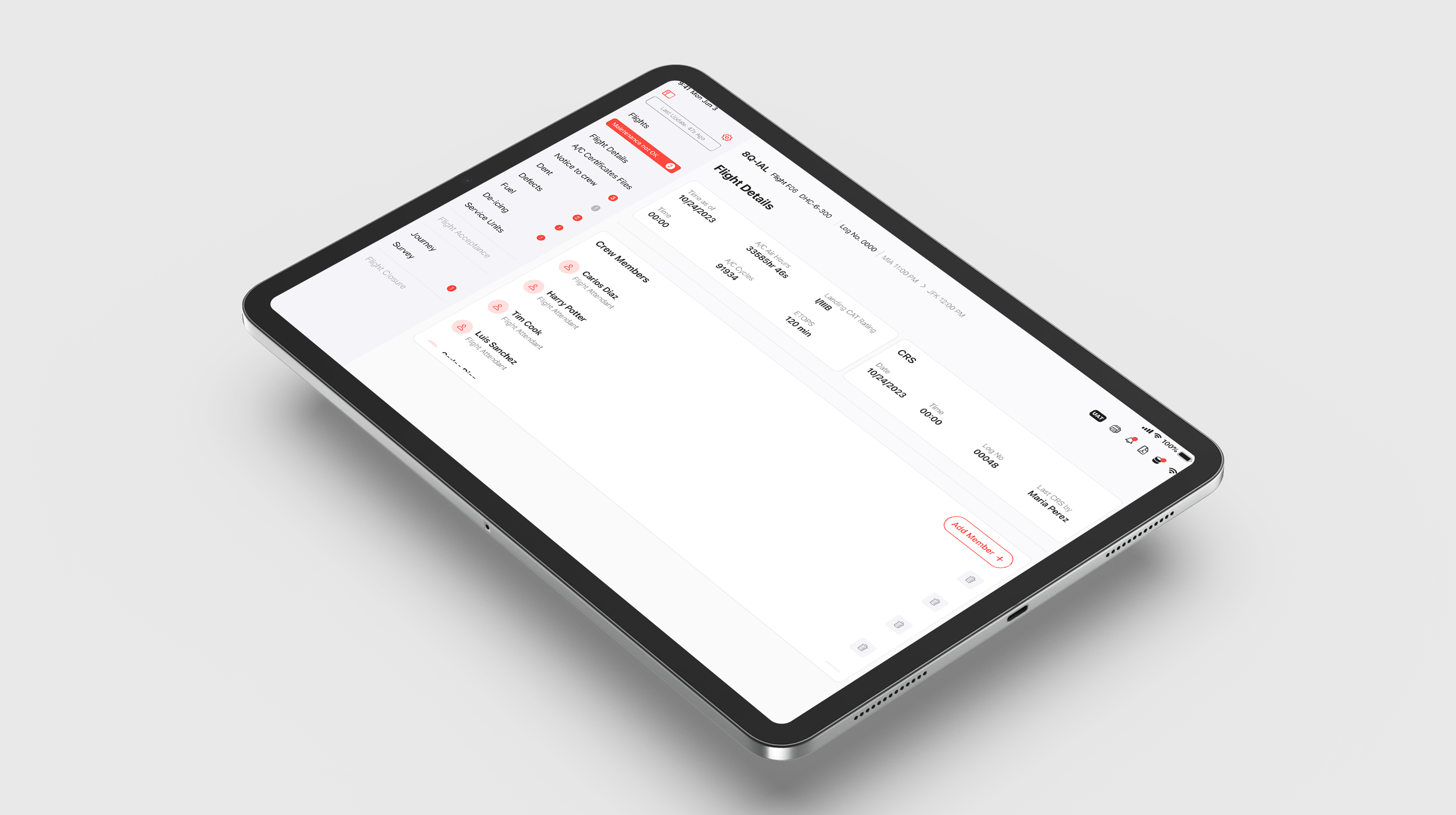
I focused on creating user-centric wireframes that addressed pain points identified in our research. Based on feedback from stakeholders and users, the design enables easy access to features on one screen, including the creation of a defect and a maintenance report.
Design System
To maintain consistency across screens, I established a modular system:
- Buttons: Primary, secondary, and destructive states with padding rules
- Typography: Bold headers, consistent sub-labels for scanability
- Color: Role-based colors contrast checks
- Components: Navigation tabs, status badges, data rows with contextual actions
I documented this in a shared Figma library with clear handoff notes for developers, ensuring alignment as we scaled.
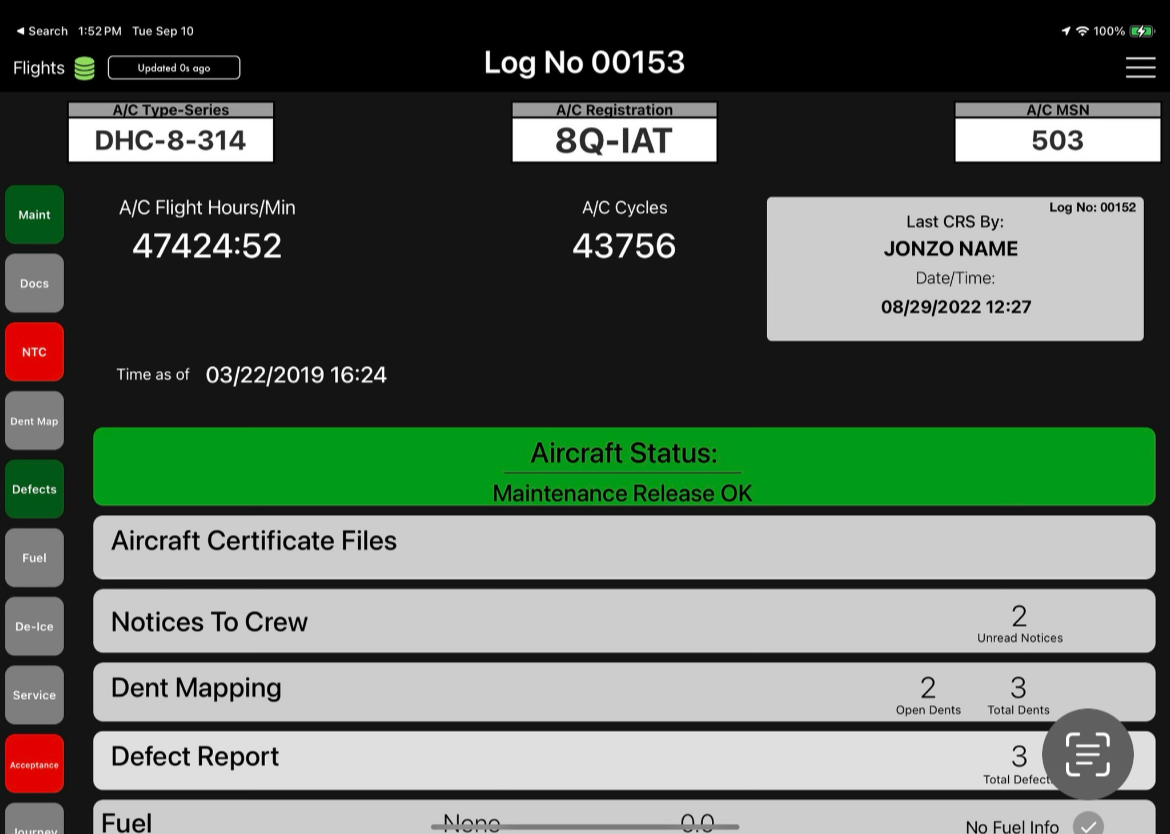
Before
.png)
After
Usability Test & Focus Group
I conducted a focus group with actual pilots to gain a deeper understanding of their pain points and to validate our design decisions. The goal was to see how the design could alleviate frustrations related to paperwork. Additionally, I performed in-depth usability testing with product specialists who transitioned from being pilots, which helped us gather comprehensive user feedback efficiently.
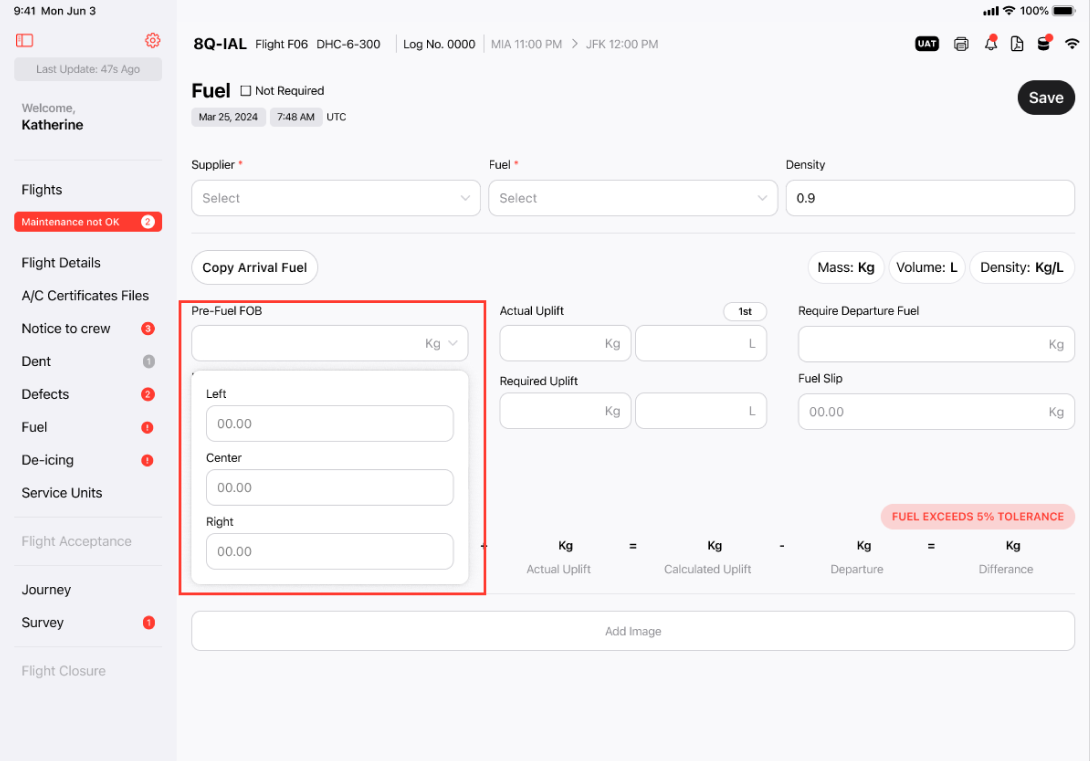
BEFORE
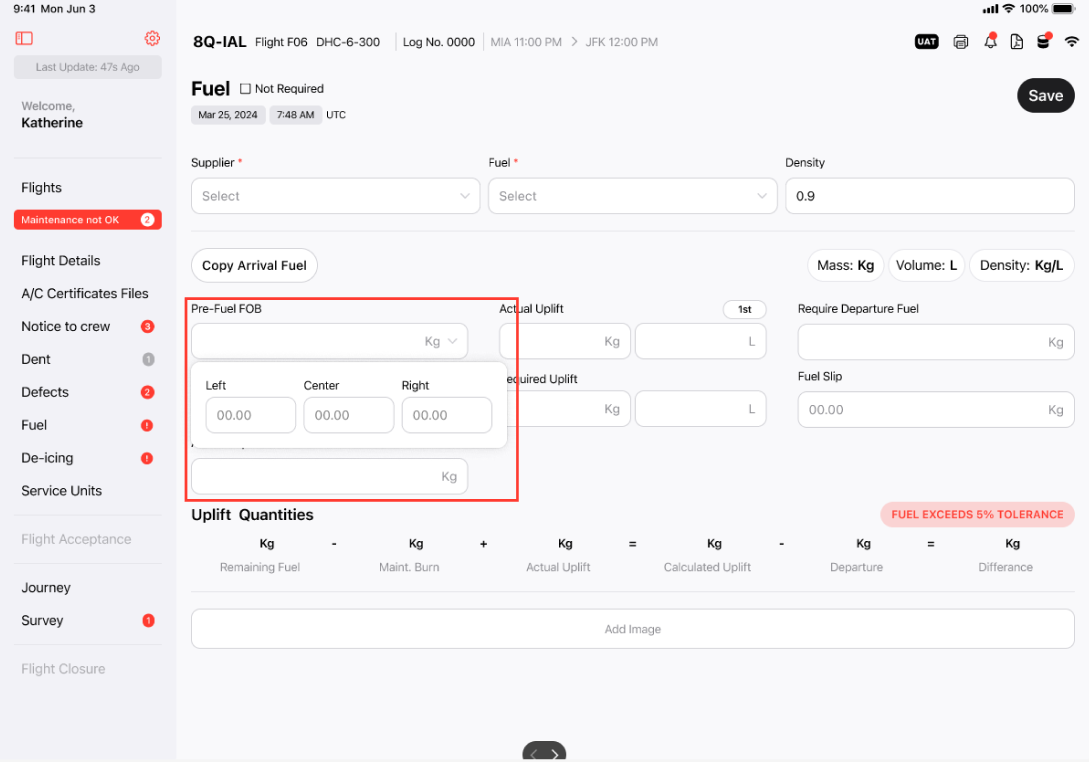
AFTER
Stakeholders decide to show the fuel tanks horizontally to reference what the user is used to seeing in their manual
Pre-flight checklist.
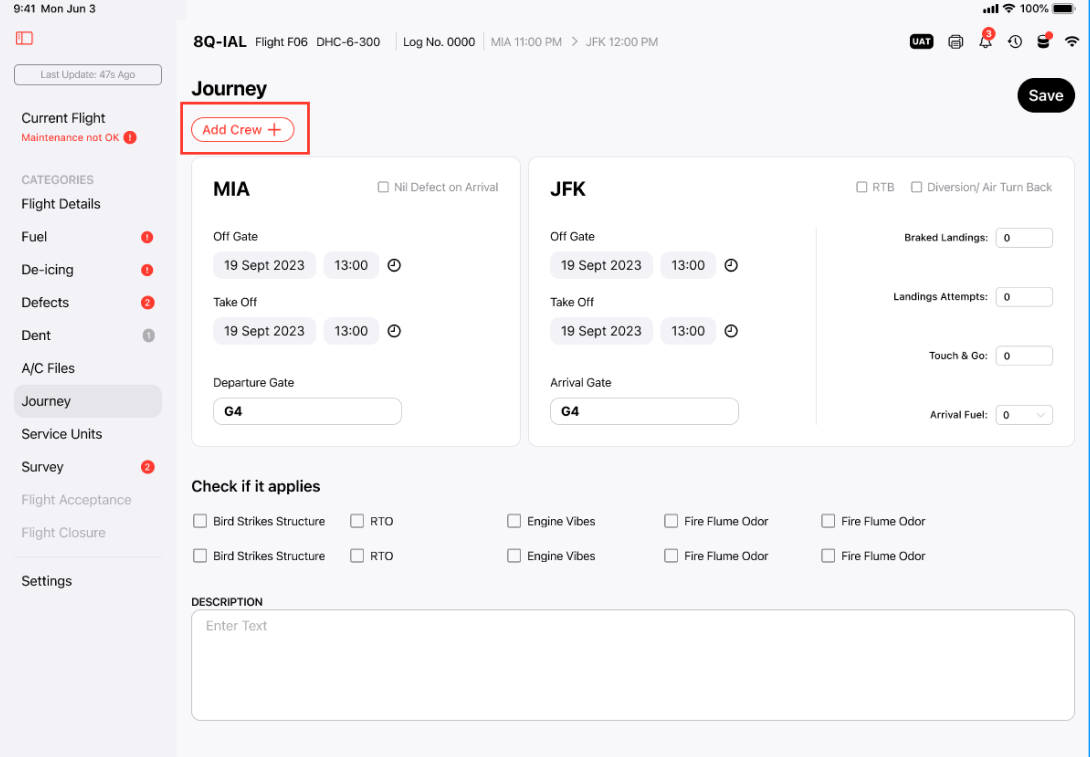
BEFORE
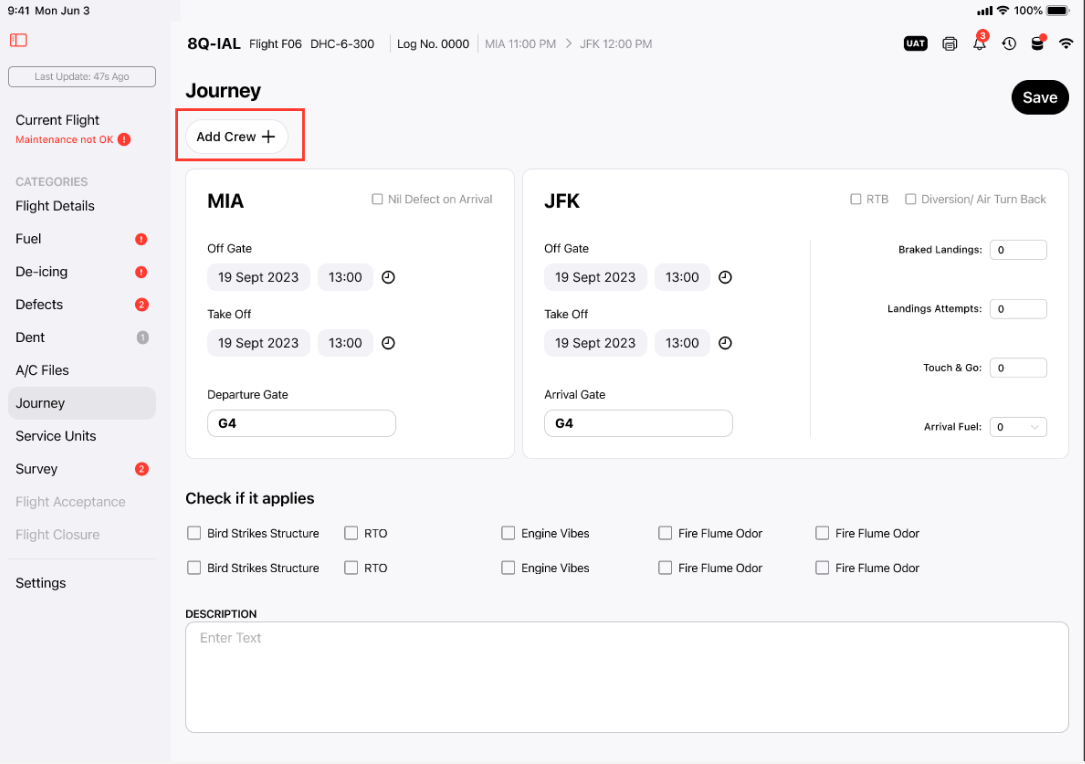
AFTER
Users suggested to change the naming of the button. They also suggested changing the color of the button because it was representing an error and making it bigger for better readability.
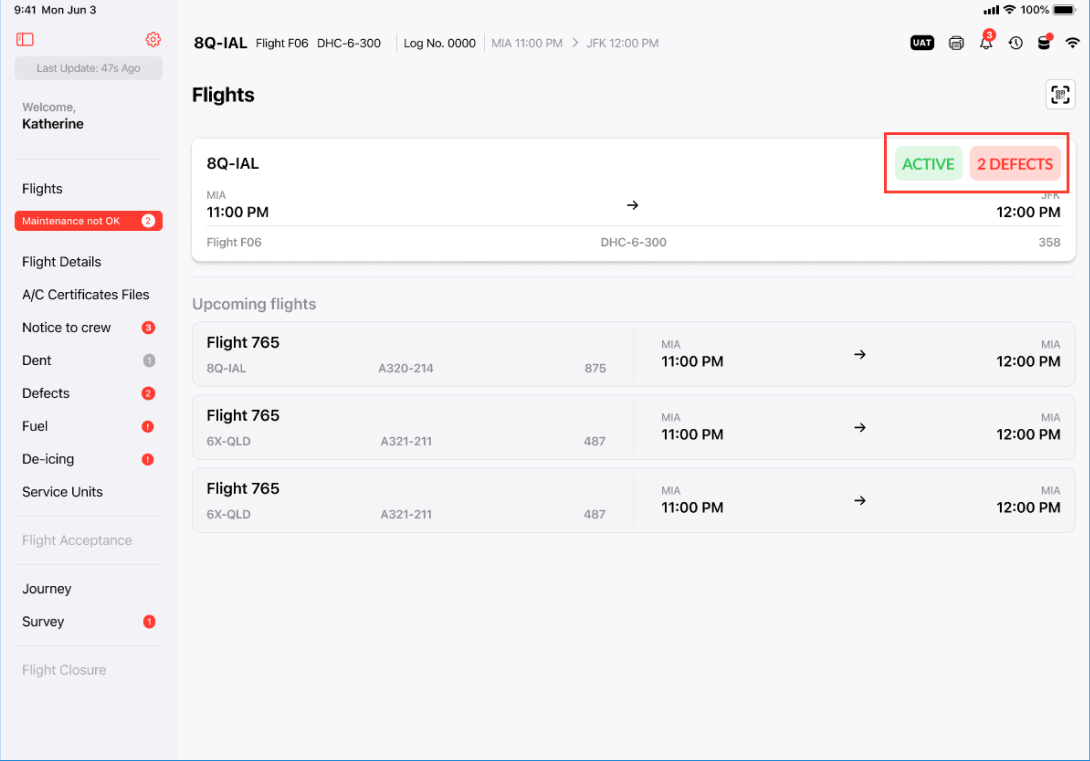
BEFORE
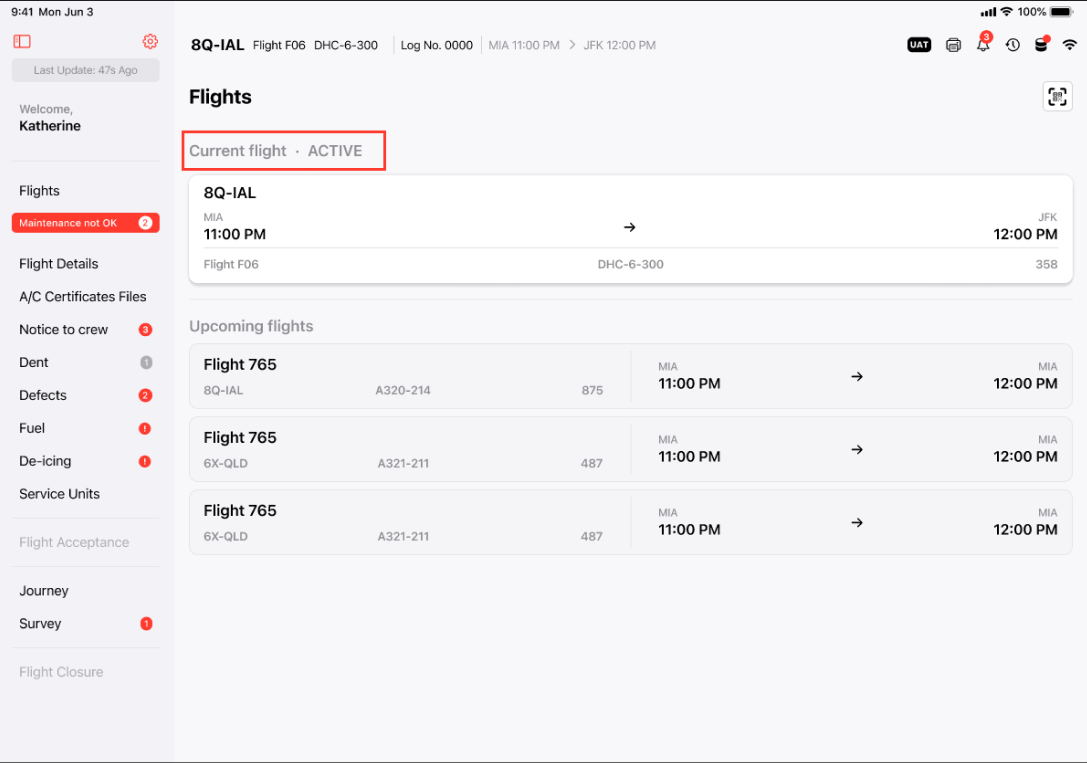
AFTER
Based on the discussion the stakehodlers request to change the "ACTIVE STATUS" location and remove the "DEFECT Button" form the current Flight card. We opted to move it on top of the Flight card for quick visability.
Analytics-Driven Insights
While PilotLog was task-focused, I wanted to offer value beyond task completion. I introduced a performance summary screen:
- Task history by aircraft and status
- Report turnarounds
- Error flags and recurring issue tracking
While basic for now, this insight layer creates future opportunities for:
- Preventive maintenance alerts
- Technician accountability
- Business-wide aircraft health monitoring
End Results
After testing, the results spoke for themselves:
- ✨ Stakeholders said the new dashboard felt familiar—“like other apps I already use”
- 📉 Error messages were easier to read and understand
- 🔄 Faster workflows: tasks were completed in fewer taps with less confusion
- 🧠 Clearer labeling reduced memory load
- 🗂 Tab order matched pilots’ paperwork, making the digital process easy to memorize
Reflection
Key Takeaways
I collaborated closely with product owners, developers, and users to enhance the app's visual design and user experience. Our modern design approach received positive feedback, resulting in a significant improvement of the average user rating from 5 to 8. By incorporating design patterns from similar applications, we created an intuitive interface that allowed users to interact with the product seamlessly, even without prior knowledge. This approach reduced cognitive load and ultimately improved user productivity.
What did I learn?
User feedback is vital for design improvements. During my project at a software company developing maintenance applications for pilots, I realized the importance of user-centric design. As the sole designer, I focused not only on creating appealing interfaces but also on advocating for user needs.
A well-developed user research plan helped uncover key insights and pain points. However, direct interactions with pilots were most valuable in shaping the final design. Engaging with them provided a deeper understanding of their challenges and workflow requirements, leading to a more intuitive and effective application.